Introduction
Java Streams provide a powerful and efficient way to process and manipulate collections of data using a functional programming approach.
Functional programming is a programming paradigm that treats computation as the evaluation of mathematical functions and avoids changing state or mutable data.
In this guide, we’ll explore key concepts such as creating Streams, applying intermediate and terminal operations, mapping and filtering data, and performing aggregations.Java Streams provide a powerful and efficient way to process and manipulate collections of data using a functional programming approach.
With a focus on best practices, this comprehensive overview will help you master Java Streams, improving both the performance and readability of your code.
What are Java Streams?
A stream is an abstraction that provides you with a way to immutably process a sequence of elements such as collections and array in a function style. Streams represent a sequence of data that can be processed in parallel or sequentially, supporting aggregate functions like collecting, filtering, mapping, reducing, sorting, etc.
Visit the Stream API Java documentation
Understanding the Difference Between Java Collections and Streams
It is crucial to understand the differences between Java collections and streams to write efficient and maintainable Java programs. Here are some key differences between collections and streams.
| Collection | Stream |
|---|---|
Java collections are meant to store and manage data. They are data structures. Examples include: Set, List, Map, Queue |
Streams provide a way in which collections can be processed in a functional manner. Examples include: DoubleStream, IntStream, Stream |
| Java collections are mutable to some extent, allowing elements to be added, removed, or updated. | Streams do not mutate the original data structure. A new stream (in case of intermediate operation) or a new object (in case of terminal operation) is produced. |
| Focus on create, read, update and delete operations. Encourages imperative programming style. | Focus on transformation and aggregation operations in a functional approach. |
You need to manually implement multithreading for parallelism, probably using ExecutorService. |
There is an in-built support for parallelism using parallelStream(). |
| The size of a collection is always known. | Stream has an unknown size. This is because elements are processed sequentially or in parallel without direct access to individual elements |
Benefits of using Streams in Java
There are significant benefits such as code readability, conciseness, maintainability and performance offered by Java streams.
- Immutability: A stream operation does not modify the underlying data structure. Instead, a new stream or result is produced.
- Parallelism: Streams can easily be parallelized to leverage multi-core processors for improved performance.
Function<Integer, Integer> complexOperation = i -> {
    // Executing some complex operation
    return i * 2;
};

List<Integer> numbers = IntStream.range(0, 1_000)
        .collect(ArrayList::new, ArrayList::add, ArrayList::addAll);
int sum = numbers.parallelStream()
        .map(complexOperation)
        .reduce(0, Integer::sum);
- Functional: Streams support a functional programming approach, allowing the use of lambda expressions and method references. It allows you to focus on what you want to achieve rather than how to do it.
List<Integer> scores = Arrays.asList(1, 2, 3, 4, 5);
int sum = scores.stream()
        .reduce(0, Integer::sum);
- Pipelining: Intermediate operations can be chained together to form a pipeline. The result of an operation can be passed to the next operation. This improves efficiency and readability.
List<String> names = List.of("Jasmine", "Nkengbeza", "Einstein");
List<String> upperCaseNames = names.stream()
                                   .filter(name -> name.contains("in"))
                                   .map(String::toUpperCase)
                                   .toList;
- Conciseness: Stream operations often lead to more concise code compared to traditional loop-based approaches. Boilerplate code like loops, conditionals, and temporary variables are reduced, making your code cleaner and easier to maintain.
- Readability: The functional style of stream operations can make code more declarative and easier to understand.
- Flexibility: Streams provide a rich set of operations such as
map,filter,sorted,collect,reduceand many more, giving you powerful tools to easily manipulate and process data. - Lazy Evaluation: Intermediate operations (like
map,filter) are not processed until a terminal operation (likecollect,forEach) is invoked. This can lead to performance optimizations by avoiding unnecessary computations.
public void parseCatalinaLog() throws IOException {
    String filePath = "apache-tomcat/logs/catalina.out"; // 50GB

    // We are using Files.lines() for efficient line-by-line reading
    try (Stream<String> lines = Files.lines(Paths.get(filePath))) {
        lines.forEach(line -> {
            // Perform some operation on each line
        });
    }

    // To enable buffering, we are using BufferedReader
    try (BufferedReader reader = new BufferedReader(new FileReader(filePath))) {
        Stream<String> lines = reader.lines();
        lines.forEach(line -> {
            // Perform some operation on each line
        });
    }
}
Creating a Stream
From Collections, Sets
List<Integer> scores = List.of(90, 48, 83, 89);
Stream<Integer> stream = scores.stream();
Stream.of() and Arrays.stream()
Stream<String> streamOf = Stream.of("Jasmine", "Nkengbeza", "Fontem", "Carter");
Stream<Boolean> streamArrays = Arrays.stream(new Boolean[]{true, false, true});
Infinite Streams and generating Streams with Stream.generate() and Stream.iterate()
// Generating infinite streams with Stream.generate().
// We have applied an intermediate operation to limit the result to 100
Stream<Integer> generatedDiceStream = Stream.generate(() -> (int) (Math.random() * 6) + 1);
Stream<Integer> generateDiceFaces = generatedDiceStream.limit(100);

// Generating infinite streams with Stream.iterate(). The seed is 1. The next data of the stream is n * 2
// We have applied an intermediate operation to limit the result to 100
Stream<BigInteger> iteratedStream = Stream.iterate(BigInteger.ONE, n -> n.multiply(BigInteger.valueOf(2)));
Stream<Integer> multiplyStream = iteratedStream.limit(100);
Stream Operations: Intermediate vs. Terminal
Intermediate Operations
Intermediate operations are provide a way to modify a stream but do not produce a final output. These operations return a new stream. Other operations can be chained to their output.
The result of intermediate operations is available only after a terminal operation has been invoked on the stream.
The following are examples of intermediate operations:
distinct()removes duplicatemap(Function)transforms a stream of object to anotherfilter(Predicate)filters elements based on a given conditionlimit(n)limits the number of elements in a stream to a specified countskip(n)skips the first n numbers of a streamsorted()sorts the elements of a stream in a natural order
Terminal Operations
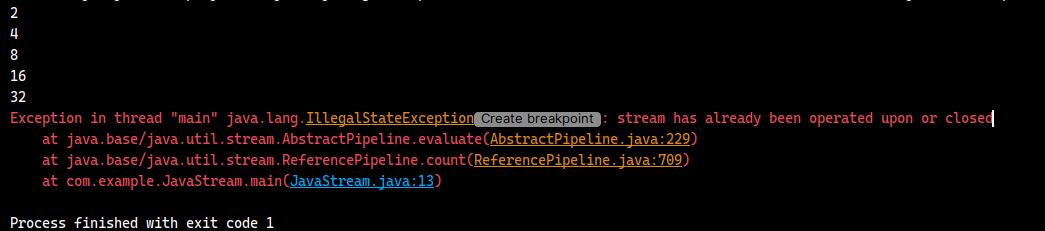
Terminal operations are Java stream operations that return a result or have a side effect. Once a terminal operation has been invoked, the stream is processed and terminates. If we try to invoke a terminal operation on a stream twice, an exception will be thrown.
Consider the snippet below.
public void terminalOperation() {
    Stream<Long> infiniteStream = Stream.iterate(2L, n -> n * 2);
    infiniteStream.limit(5).forEach(System.out::println);
    long count = infiniteStream.count();
    System.out.println(count);
}
If we try to execute the snippet, an IllegalStateException will be thrown.
The following are examples of intermediate operations:
allMatch(Predicate<T>)returns true if all stream elements match the given predicate.anyMatch(Predicate<T>)returns true if there exists any stream element matches the given predicate.collect(Collector<T, A, R>)collects stream elements into a mutable collection such as list, set, etc.count()returns the total number of elements in a stream.findAny()returns the any element of the stream or an empty optional if stream is empty.findFirst()returns the first element of the stream or an empty optional if stream is empty.forEach(Consumer<T>)performs an action for each stream element.max()returns the maximum element of the stream.min()returns the minimum element of the stream.noneMatch(Predicate<T>)returns true if no stream element matches the given predicate.toList()collects stream elements into a immutable list.reduce(T, BinaryOperator)performs a reduction operation on the elements of the stream. The elements are reduced to a single value using an associative accumulation function.
Short-circuiting Operations
These operations are terminal operations that aren't required to completely process the entire stream to produce a result or have an effect. The stream pipeline may be exited early, hence saving resources.
They include:
allMatch(Predicate<T>)immediately terminates and returns true if all stream elements match the given predicate.anyMatch(Predicate<T>)immediately terminates and returns true if any stream element matches the given predicate.noneMatch(Predicate<T>)immediately terminates and returns false if any stream element matches the given predicate.findAny()immediately terminates and returns any element of the stream.findFirst()immediately terminates and returns the first element of the stream.
Mapping and Transforming Data
We can elegantly process and transform collections with Java streams in a concise and functional manner. The mapping and transformation of data are the most essential operations in the Java Stream API. This allows of the conversion of data in a stream from one form to another.
Transforming Elements in a Stream
Stream elements can be transformed using the map() method. A given function is applied to each element of
the stream. This will produce a new stream of the transformed elements.
Steps:
- Create a new stream.
- Chain the
map()method to the stream. Themap()accepts a typeFunction<T, R>. The function returns a new stream element. - Finally we can call a terminal operation to get the final result.
Stream<String> numberStreams = Stream.of("1", "2", "3", "4");
Function<String, Integer> mapFunction = s -> Integer.parseInt(s) * 2;
List<Integer> numbers = numberStreams.map(mapFunction).toList();

// Or

List<Integer> numbers = Stream.of("1", "2", "3", "4")
        .map(s -> Integer.parseInt(s) * 2)
        .toList();

System.out.println(numbers);

// Prints [2, 4, 6, 8]
Flattening Nested Structures and Transforming Elements
Java streams provide us with a way to flatten nested structures like list within a list and transform these elements
simultaneously. This can be achieved using the flatMap() method. This method transforms each element in a
stream and returns a stream of element. The resulting streams are merged into a single stream.
List<List<String>> names = List.of(
        List.of("Nkengbeza", "Jasmine", "Liam", "Fontem"),
        List.of("Trump", "Carter", "Obama"),
        List.of("Mansa Musa", "Sundiata Keita", "Imhotep")
);

List<String> flattenedNames = names.stream()
        .flatMap(Collection::stream)
        .map(String::toUpperCase)
        .toList();

System.out.println(flattenedNames);

// Prints: [NKENGBEZA, JASMINE, LIAM, FONTEM, TRUMP, CARTER, OBAMA, MANSA MUSA, SUNDIATA KEITA, IMHOTEP]
Using mapToInt(), mapToDouble(), and mapToLong()
These are specialized transformation stream methods. They are specifically designed to map stream elements to primitive
types (int, double, long) directly, i.e. IntStream, DoubleStream and LongStream.
This leads to an improved in performance, compared to using map() with boxing and unboxing operations.
These methods are useful when performing numerical operations live average, summation or other calculations efficiently.
a. IntStream mapToInt(ToIntFunction<T>)
List<String> numbers = List.of("1", "2", "3", "4", "5", "6", "7", "8", "9", "10");
int sum = numbers.stream()
        .mapToInt(Integer::parseInt)
        .sum();
System.out.println(sum);

// Prints 55
b. DoubleStream mapToDouble(ToDoubleFunction<T>)
List<String> numbers = List.of("1", "2", "3", "4", "5", "6", "7", "8", "9", "10");
double sum = numbers.stream()
        .mapToDouble(value -> Math.pow(Double.parseDouble(value), 2))
        .sum();
System.out.println(sum);

// Prints 386.0
c. LongStream mapToLong(ToLongFunction<T>)
List<String> sentences = List.of(
        "Homework minimum designated residential ourselves math velvet, educated donate expiration responsibilities visitor.",
        "Probe marker confidentiality know opera heavy try, phentermine reid carries clouds chile meaningful assists, weapons effect.",
        "Laundry sport trivia handed nissan dozens film, unavailable keen paypal extraordinary pay account rich, agency.",
        "Arm botswana rows indication viewing bottles loving, buyers futures handed modify boxing shift kingdom, exec effect greater empty melissa reno timothy, brooks pulled turning hosted.");
long sum = sentences.stream()
        .mapToLong(String::length)
        .sum();
System.out.println(sum);

// Prints 531
Filtering Data
Filtering allows to select elements from a stream which matches a given predicate. This is achieved using the
filter(Predicate<T>) method.
Note that the filter(Predicate<T>) is an intermediary operation which creates a new stream without
mutating the existing data.
Using filter() to filter elements from a Stream
As mentioned above, we can filter stream elements using the filter(Predicate<T>) method.
In the example below, the getAdultNamesOnly() method returns all 18+ from the list of attendees.
List<String> getAdultNamesOnly(List<Attendee> attendees) {
    int adultAge = 18;
    return attendees.stream()
            .filter(attendee -> attendee.age >= adultAge)
            .map(attendee -> attendee.getName().toUpperCase())
            .toList();
}

class Attendee {

    private String name;
    private int age;

    // Getters and setters
}
Combining filters with and(), or(), and negate()
This filter() method in Java streams can be further enhanced by using the and(),
or(), and negate() methods from Predicate interface to create complex filtering
conditions.
and()is used to combine multiple predicates using the logical AND operator
// Filter numbers between 1 and 10 inclusively
List<Integer> numbers = List.of(10, 3, 4, 2, 129, 5, 20, 8, -2, 11);

Predicate<Integer> greaterThanZeroPredicate = number -> number > 0;
Predicate<Integer> lessThan11Predicate = number -> number < 11;

List<Integer> selectedNumbers = numbers.stream()
        .filter(greaterThanZeroPredicate.and(lessThan11Predicate))
        .toList();

System.out.println(selectedNumbers);

// Prints: [10, 3, 4, 2, 5, 8]
or()is used to combine multiple predicates using the logical OR operator
// A leap year must match one of the following conditions
// 1. Divisible by 4 and not 100
// 2. Divisible by 400
List<Integer> years = IntStream.rangeClosed(1980, 2010)
        .boxed()
        .toList();

Predicate<Integer> firstPredicate = year -> year % 4 == 0 && year % 100 != 0;
Predicate<Integer> secondPredicate = year -> year % 400 == 0;

List<Year> leapYears = years.stream()
        .filter(firstPredicate.or(secondPredicate))
        .map(Year::of)
        .toList();

System.out.println(leapYears);

// Prints: [1980, 1984, 1988, 1992, 1996, 2000, 2004, 2008]
negate()is used to combine multiple predicates using the logical NOT operator. It negates a predicate.
// Filter odd numbers
List<Integer> numbers = IntStream.rangeClosed(1, 10)
        .boxed()
        .toList();

Predicate<Integer> isEvenPredicate = number -> number % 2 == 0;

List<Integer> oddNumbers = numbers.stream()
        .filter(isEvenPredicate.negate())
        .toList();

System.out.println(oddNumbers);

// Prints: [1, 3, 5, 7, 9]
- We can also combine multiple predicates together.
// A leap year must match one of the following conditions
// 1. Divisible by 4 and not 100
// 2. Divisible by 400
List<Integer> years = IntStream.rangeClosed(1980, 2010)
        .boxed()
        .toList();

Predicate<Integer> by4Predicate = year -> year % 4 == 0;
Predicate<Integer> by100Predicate = year -> year % 100 == 0;
Predicate<Integer> by400Predicate = year -> year % 400 == 0;

Predicate<Integer> isLeapYearPredicate = by4Predicate.and(by100Predicate.negate()).or(by400Predicate);

List<Year> leapYears = years.stream()
        .filter(isLeapYearPredicate)
        .map(Year::of)
        .toList();

System.out.println(leapYears);

// Prints: [1980, 1984, 1988, 1992, 1996, 2000, 2004, 2008]
Aggregation and Reduction
In Java streams, the reduce() method is a versatile method used to aggregate and reduce streams into a single result.
It provides a functional approach to perform reductions, such as summation of numbers, strings concatenation or
calculating average or minimum/maximum numbers.
The reduce() operation: Performing aggregations and combining results
Reduction is a more general terminal operation that combines stream elements into a single result using a custom
reduction function. The reduce() method is used for reduction, and it can take an identity value, a binary operator,
and optionally a combiner for parallel streams.
int sum = Stream.of(1, 2, 3, 4, 5, 6, 7, 8, 9, 10)
        .reduce(0, (a, b) -> a + b);

System.out.println(sum);

// Prints: 55
Other aggregation operations: sum(), min(), max(), average(), and collect()
These other aggregate operators provide us with ways to summarize or compute values from a set of data points.
sum()computes the sum of numbers
int sum = Stream.of(1, 2, 3, 4, 5, 6, 7, 8, 9, 10)
        .mapToInt(i -> i)
        .sum();

System.out.println(sum);

// Prints: 55
min()returns the minimum number in a collection
OptionalInt min = Stream.of(1, 2, 3, 4, 5, 6, 7, 8, 9, 10)
        .mapToInt(i -> i)
        .min();

min.ifPresent(System.out::println);

// Prints: 1
max()returns the maximum number in a collection
OptionalInt max = Stream.of(1, 2, 3, 4, 5, 6, 7, 8, 9, 10)
        .mapToInt(i -> i)
        .max();

max.ifPresent(System.out::println);

// Prints: 10
average()returns the average of the numbers in a collection. Average = Sum of all numbers / Number count
OptionalDouble average = Stream.of(1, 2, 3, 4, 5, 6, 7, 8, 9, 10)
        .mapToInt(i -> i)
        .average();

average.ifPresent(System.out::println);

// Prints: 5.5
collect()aggregates stream elements to a collection.
List<Integer> numbers = Stream.of(1, 2, 3, 4, 5, 6, 7, 8, 9, 10)
        .map(i -> i * 2)
        .collect(Collectors.toList());

System.out.println(numbers);

// Prints: [2, 4, 6, 8, 10, 12, 14, 16, 18, 20]
Collecting Results
Java Streams provide awesome capabilities for processing collections. The Collectors utility class provides various
collectors that can be used to collect the results of a stream.
Collectors: Using Collectors.toList(), Collectors.toSet(), and Collectors.toMap()
Collectors.toList()collects the stream elements to an immutable list.
List<String> list = Stream.of("Jasmine", "Clinton", "Clotilda")
                          .collect(Collectors.toList());

System.out.println(list);

// Prints: [Jasmine, Clinton, Clotilda]
Collectors.toSet()collects the stream elements to an immutable set. No duplicates allowed. This removes duplicates from the stream.
Set<String> set = Stream.of("Jasmine", "Clinton", "Clotilda", "Jasmine", "Clinton", "Clotilda")
                          .collect(Collectors.toSet());

System.out.println(set);

// Prints: [Jasmine, Clinton, Clotilda]
Collectors.toMap()collects the stream elements to an immutable map. It requires a key mapper and a value mapper to determine the key-value pairs for the map. There's also an optional merge logic for handling duplicate keys.
Map<String, Integer> map = Stream.of("Jasmine", "Clinton", "Clotilda")
        .collect(Collectors.toMap(name -> name, name -> name.length()));

System.out.println(map);

// Prints: {Clotilda=8, Jasmine=7, Clinton=7}

Map<String, Integer> handlingDuplicates = Stream.of("Jasmine", "Clinton", "Clotilda", "Jasmine", "Clotilda")
        .collect(Collectors.toMap(name -> name,
                        name -> 1,
                        (oldValue, newValue) -> oldValue + newValue
                )
        );

        System.out.println(handlingDuplicates);

// Prints: {Clotilda=2, Jasmine=2, Clinton=1}
It is worth noting that
- The
List,SetandMapcreated by this collectors are immutable. They are unmodifiable after creation. - These collectors are thread-safe. Hence, they can be used with parallel streams.
Grouping and partitioning elements with Collectors.groupingBy() and Collectors.partitioningBy()
We are also provided with an advanced way of collecting and handling streams using Collectors.groupingBy() and
Collectors.partitioningBy().
Collectors.groupingBy()groups elements of a stream into a Map based on a classifier function. It determines the key under which each element will be grouped. Stream elements can be grouped based on properties or characteristics. Also, we can group be downstream collectors by applying additional collectors to the grouped elements, such as counting them or collecting them into a different data structure.
// Basic grouping
Map<Character, List<String>> group = Stream.of("Jasmine", "Clinton", "Clotilda")
        .collect(Collectors.groupingBy(item -> item.charAt(0)));

System.out.println(group);

// Prints: {C=[Clinton, Clotilda], J=[Jasmine]}

// Grouping with Downstream Collectors
Map<Character, Long> collectorGrouping = Stream.of("Jasmine", "Clinton", "Clotilda")
        .collect(
                Collectors.groupingBy(item -> item.charAt(0), Collectors.counting())
        );

System.out.println(collectorGrouping);

// Prints: {C=2, J=1}
Collectors.partitioningBy()partitions stream elements into two groups using a predicate. The result will be aMapcontaining two keys:trueandfalse. The values associated withtrueare those that match the predicate. While the values associated withfalseare those that do not match the predicate.
Map<Boolean, List<Integer>> result = Stream.iterate(1980, year -> year + 1)
        .limit(20)
        .collect(Collectors.partitioningBy(year -> (year % 4 == 0 && year % 100 != 0) || (year % 400 == 0)));

System.out.println(result);

// Prints: {false=[1981, 1982, 1983, 1985, 1986, 1987, 1989, 1990, 1991, 1993, 1994, 1995, 1997, 1998, 1999], true=[1980, 1984, 1988, 1992, 1996]}
Joining elements using Collectors.joining()
The main purpose of Collectors.joining() is to concatenate a stream elements into a unified string, optionally using a
delimiter, a prefix and a suffix.
We can flexibly control the output in a convenient manner by specify the desired delimiter and prefix/suffix. This is ideal for generating human-readable list or structured output.
Collectors.joining()Joins the stream elements with no delimiter.
String noDelimiter = Stream.iterate(0, n -> n + 1)
        .limit(10)
        .map(Object::toString)
        .collect(Collectors.joining());

System.out.println(noDelimiter);

// Prints: 0123456789
Collectors.joining(delimiter)Joins the stream elements with a delimiter
String delimiter = Stream.iterate(0, n -> n + 1)
        .limit(10)
        .map(Object::toString)
        .collect(Collectors.joining(", "));

System.out.println(delimiter);

// Prints: 0, 1, 2, 3, 4, 5, 6, 7, 8, 9
Collectors.joining(delimiter, prefix, suffix)Joins the stream elements with a delimiter, a starting string (i.e. prefix) and an ending string (i.e suffix)
String delimiterPrefixSuffix = Stream.iterate(0, n -> n + 1)
        .limit(10)
        .map(Object::toString)
        .collect(Collectors.joining(", ", "<<< ", " >>>"));

System.out.println(delimiterPrefixSuffix);

// Prints: <<< 0, 1, 2, 3, 4, 5, 6, 7, 8, 9 >>>
Conclusion
In conclusion, Java Streams offer a powerful, concise and elegant approach to manipulating and processing data collections. They provide a functional programming style that is expressive, readable, and maintainable.
Key benefits of Java Streams include:
- Immutability: Stream operations do not modify the underlying data structure.
- Parallelism: Streams can be easily parallelized to leverage multi-core processors for improved performance.
- Functional style: Streams support a functional programming approach, allowing the use of lambda expressions and method references.
- Conciseness: Stream operations often lead to more concise code compared to traditional loop-based approaches.
- Readability: The functional style of stream operations can make code more declarative and easier to understand.
- Flexibility: Streams provide a rich set of operations such as map, filter, sorted, collect, reduce and many more, giving you powerful tools to easily manipulate and process data.
- Lazy Evaluation: Intermediate operations are only evaluated when a terminal operation is invoked on the stream.
By understanding and effectively using Java Streams, you can significantly enhance the efficiency, readability, and maintainability of your Java programs.
In part 2, we will dive deep into more advanced topics like parallel streams for performance optimization, working with primitive types, error handling, and real-world use cases.
Tagged

Hey there, fellow code enthusiasts! I’m Nkengbeza Clinton, a software engineer passionate about building scalable, reliable systems. I’ve been programming since 2016 and love learning and sharing knowledge. This blog is my way of giving back and helping others on their software engineering journey. Grab a coffee and let’s dive into the world of code together!