Introduction
A few months ago, I worked on a feature that enables users to upload documents as part of a SWIFT transfer request process. These files are submitted for back-office review, typically for KYC and AML checks.
At first glance, it seems simple: users upload files -> back office downloads and reviews -> decision is made.
But there's a critical layer often overlooked: File uploads are one of the most common attack vectors in modern web applications. And in this case, the risk is even higher because the files are eventually opened manually by administrators; creating an opportunity for targeted attacks on internal staff. Without proper controls, they can lead to serious vulnerabilities such as remote code execution, malware distribution, data exfiltration, and privilege escalation.
Initially, the requirement stated:
"Allow users to upload any file type."
This introduces serious security issues. Even if we eventually restrict it to PDF, spreadsheet, word and image formats, here’s what could still go wrong:
- MIME type spoofing. A
.jpgthat’s actually an executable in disguise - A
.pdfwith embedded JavaScript exploits - A
.docxwith macros or embedded payloads - A stego-image image (e.g.
receipt.png) with hidden data - A crafted Excel file (
.xlsm) that runs code on open - Oversized payloads causing denial of service
- Path traversal attacks via crafted filenames
And these aren’t theoretical. Tools like Metasploit allow attackers to easily embed malicious payloads into seemingly innocent files. If our admin opens such a file, their system could be compromised.
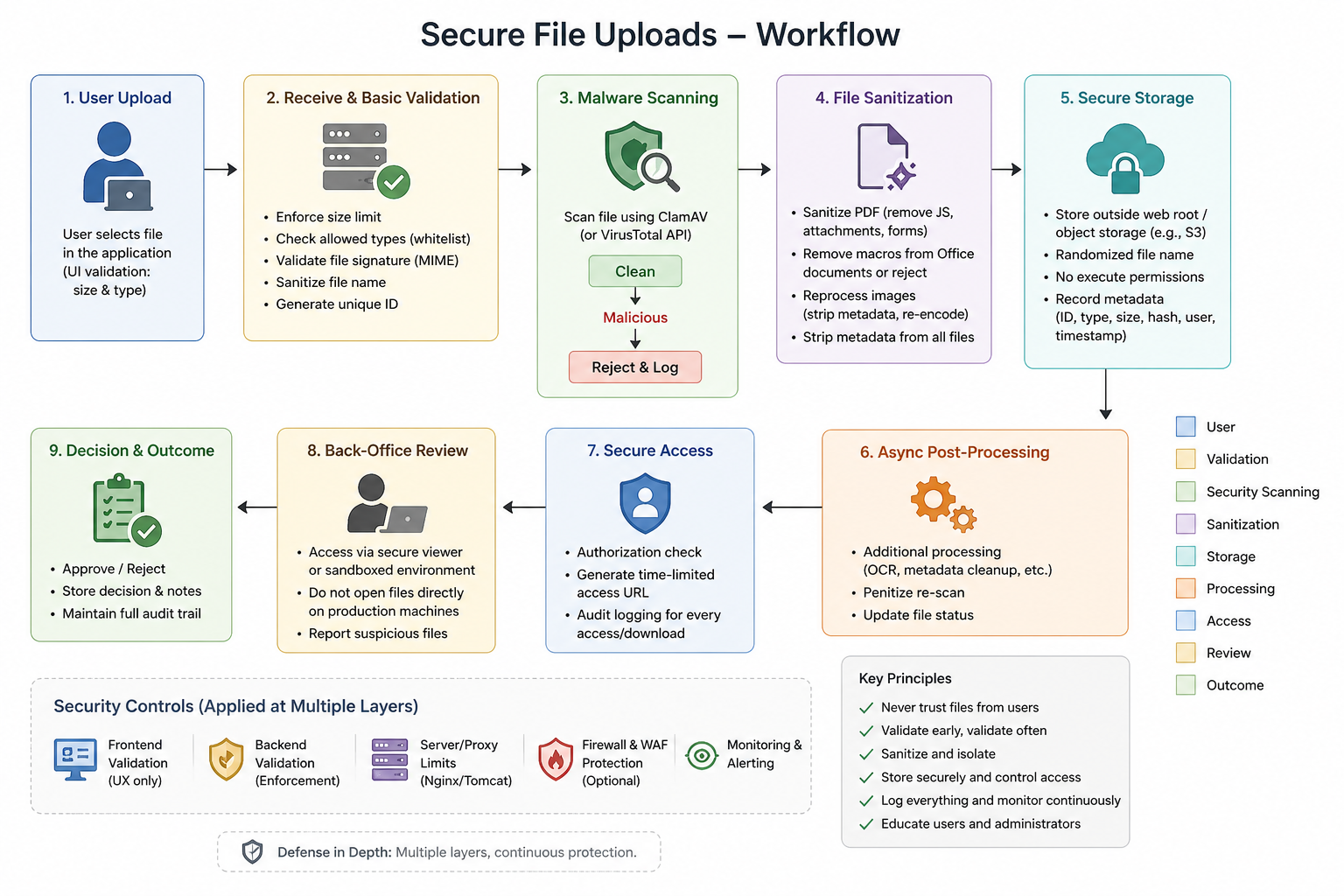
Secure File Upload Workflow
Before diving into the implementation details, here’s a high-level view of the secure file upload workflow:
How We Can Secure File Uploads?
Here’s a practical, multi-layered defense strategy to safeguard both the system and the people behind it:
A. Scan Files for Malware
Before storing or processing:
- Use ClamAV: free, open-source antivirus that runs locally
ClamAVClient clamAV = new ClamAVClient("localhost", 3310); byte[] response = clamAV.scan(uploadedFileStream); if (!ClamAVClient.isCleanReply(response)) rejectUpload(); - Use VirusTotal API: cloud-based, scans with 70+ AV engines.
These tools help us catch known malware and dangerous payloads early in the upload flow.
B. Validate MIME Types & File Signatures
Don't trust the file extension (.jpg, .pdf).
Use libraries like Apache Tika to detect the actual file type based on content:
String mimeType = tika.detect(fileInputStream);
Reject the file if you detect:
- Unexpected or dangerous MIME types
- Files with mismatched extensions
- Files starting with shebang lines (
#!/), which suggest executable scripts.
C. Normalize and Sanitize Filenames
This is often missed but important:
- Remove special characters and null bytes
- Prevent path traversal (../../etc/passwd)
- Do not use user-provided filenames for storage
- Generate safe, unique identifiers (UUIDs)
D. Sanitize PDF
PDFs can include:
- JavaScript
- Embedded attachments (e.g., ZIP files)
- Form actions that execute on open
We can use tools such as pdfcpu, QPDF, Apache PDFBox to strip JavaScript, remove embedded content and flatten form fields.
E. Neutralize Office Documents
Macro-enabled files like .docm and .xlsm are notorious for malware. We can reject macro-enabled formats outright or use Apache POI or Docx4J to parse and re-save clean versions (without macros).
F. Reprocess Image
Images are not always safe. Malware can hide in:
- EXIF metadata
- Corrupted file headers
- Hidden data streams (e.g., steganography)
We can re-encode every image using ImageIO:
  BufferedImage img = ImageIO.read(file);
  ImageIO.write(img, "jpg", sanitizedFile);
This strips metadata and safely re-encodes the image.
G. Strip Metadata from All Files
Metadata can include: author names, file paths, software versions, geolocation and hidden macros or scripts.
For PDFs, DOCX, and images, strip all metadata before storing or exposing the file.
H. Enforce File Size and Type Restrictions
It is important to always enforce the max file size (e.g 10MB), allow file types (e.g. PDF, JPEG, PNG), rejected file types (e.g .exe, .js, .sh, .bat).
This should be done in the front-end UI, backend validation and also at the server/proxy level (e.g Nginx, Apache Tomcat).
I. Secure Storage & Access
- Store uploads in a non-executable directory. It is preferable to store it outside the web root
- Use object storage (e.g., S3-compatible storage) instead of local disk when possible
- Use randomized filenames or unique identifiers
- Generate secure, time-limited access URLs
- Apply strict access controls and audit logging
- Scan files periodically even after initial upload
J. Post-Upload Processing & Isolation
A frequently overlooked layer:
- Process files asynchronously (queue-based)
- Use isolated workers or containers for file handling
- Never process files directly in the main application thread
This reduces blast radius if something goes wrong.
J. Educate Back-Office Staff
Technical controls alone are insufficient. Staff should be trained to:
- Avoid opening files directly on production systems
- Use sandboxed environments for reviewing uploads
- Report suspicious files immediately
Conclusion
This isn’t just about compliance. It's about protecting the system and the people who interact with it.
File uploads are a high-risk feature, especially in financial workflows like SWIFT transfers. A single weak point can compromise the entire system.
Most importantly, this is about protecting your team; especially back-office administrators who directly interact with user-uploaded content.
Never trust files uploaded by users.
Treat secure file uploads as a first-class requirement in every user-facing feature you build—not as an afterthought, but as a fundamental part of system design.

Hey there, fellow code enthusiasts! I’m Nkengbeza Clinton, a software engineer passionate about building scalable, reliable systems. I’ve been programming since 2016 and love learning and sharing knowledge. This blog is my way of giving back and helping others on their software engineering journey. Grab a coffee and let’s dive into the world of code together!